
Magic-Sessionmanager
See who's logged into your Strapi app - and control their sessions!


Overview
Track logins, monitor active users, and secure your app with one simple plugin. No complicated setup required.
Key Features
- ✅ See Who's Logged In - Real-time active user monitoring
- ✅ Force Logout - Terminate sessions with one click
- ✅ Session Details - IP, location, device, browser info
- ✅ Multiple Devices - Track all user devices separately
- ✅ Auto-Cleanup - Automatic inactive session cleanup
- ✅ Dashboard Widget - Quick stats on homepage
- ✅ Content Manager Integration - Session info in user sidebar
- ✅ 5 Languages - English, Deutsch, Español, Français, Português
Screenshots
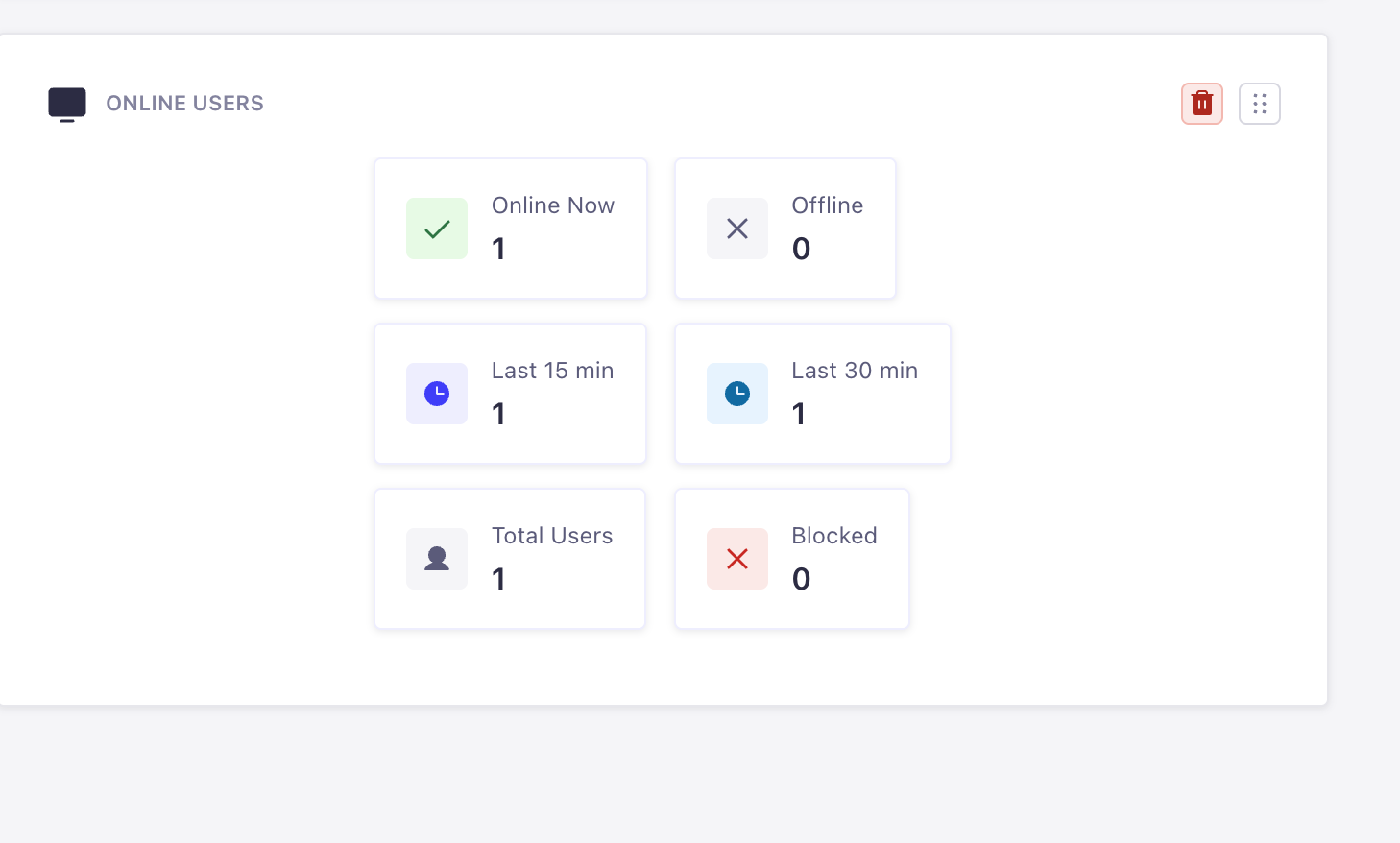 Homepage widget with quick stats at a glance
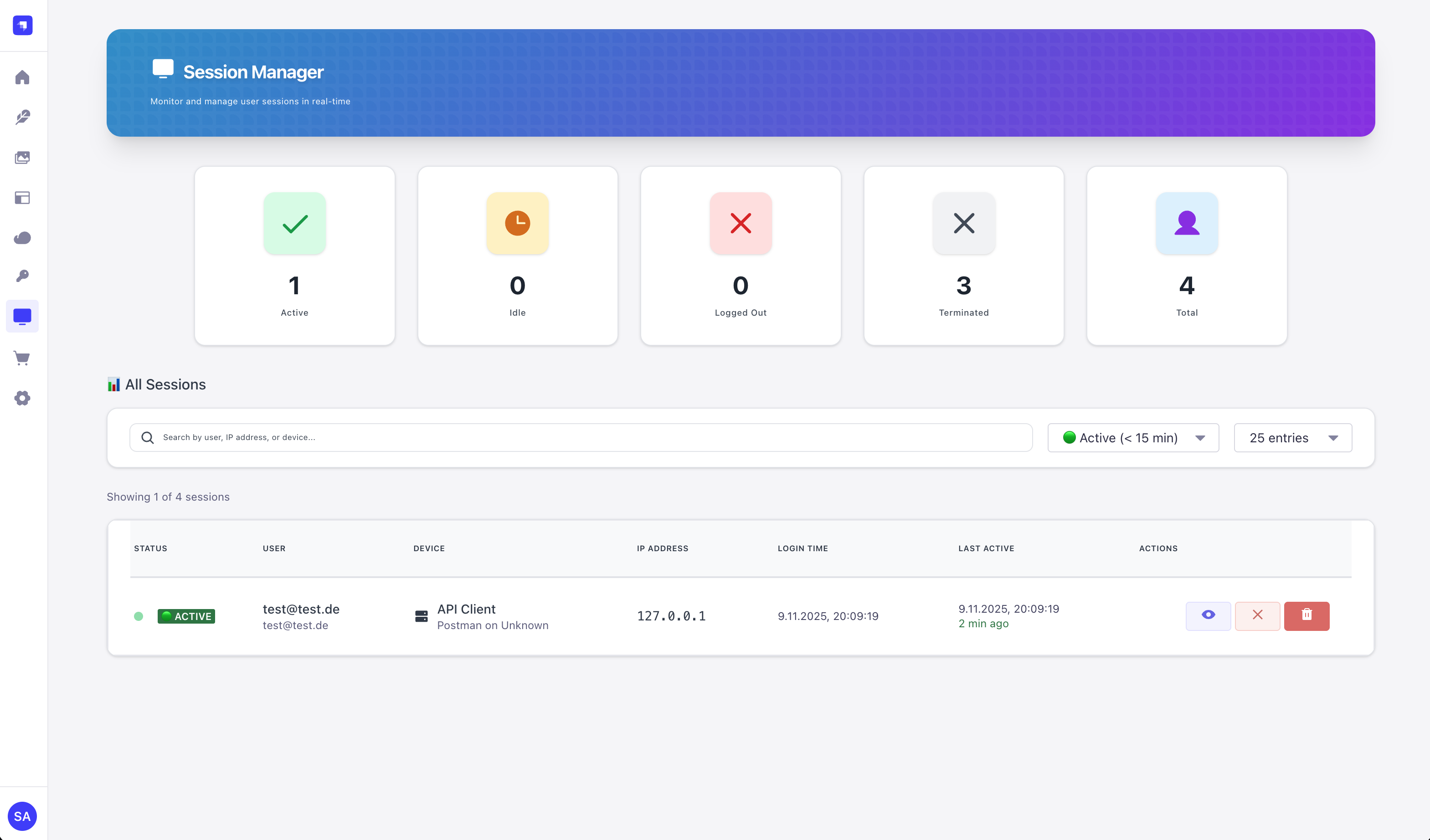 See all active sessions with real-time status
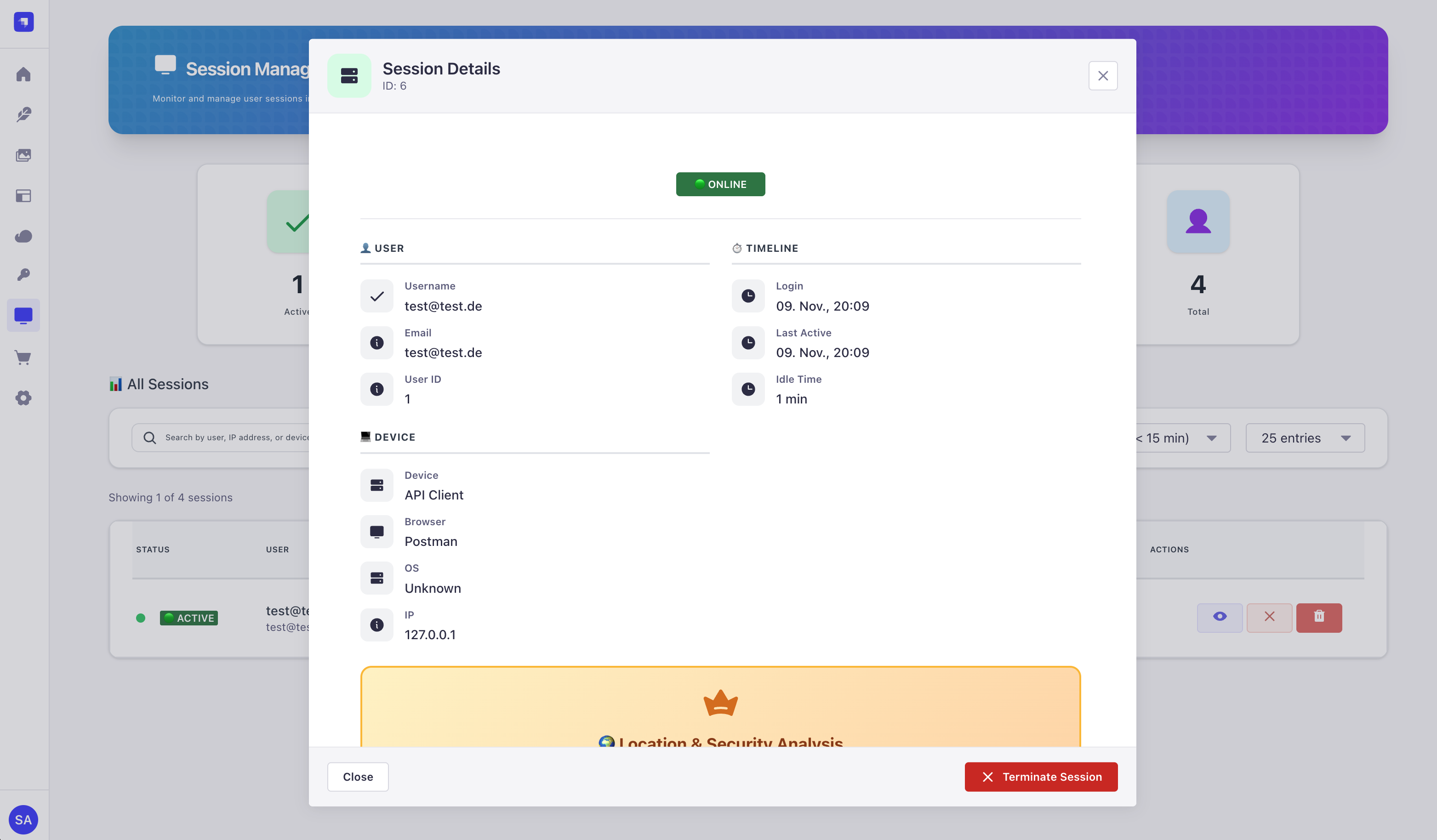 Detailed session information modal
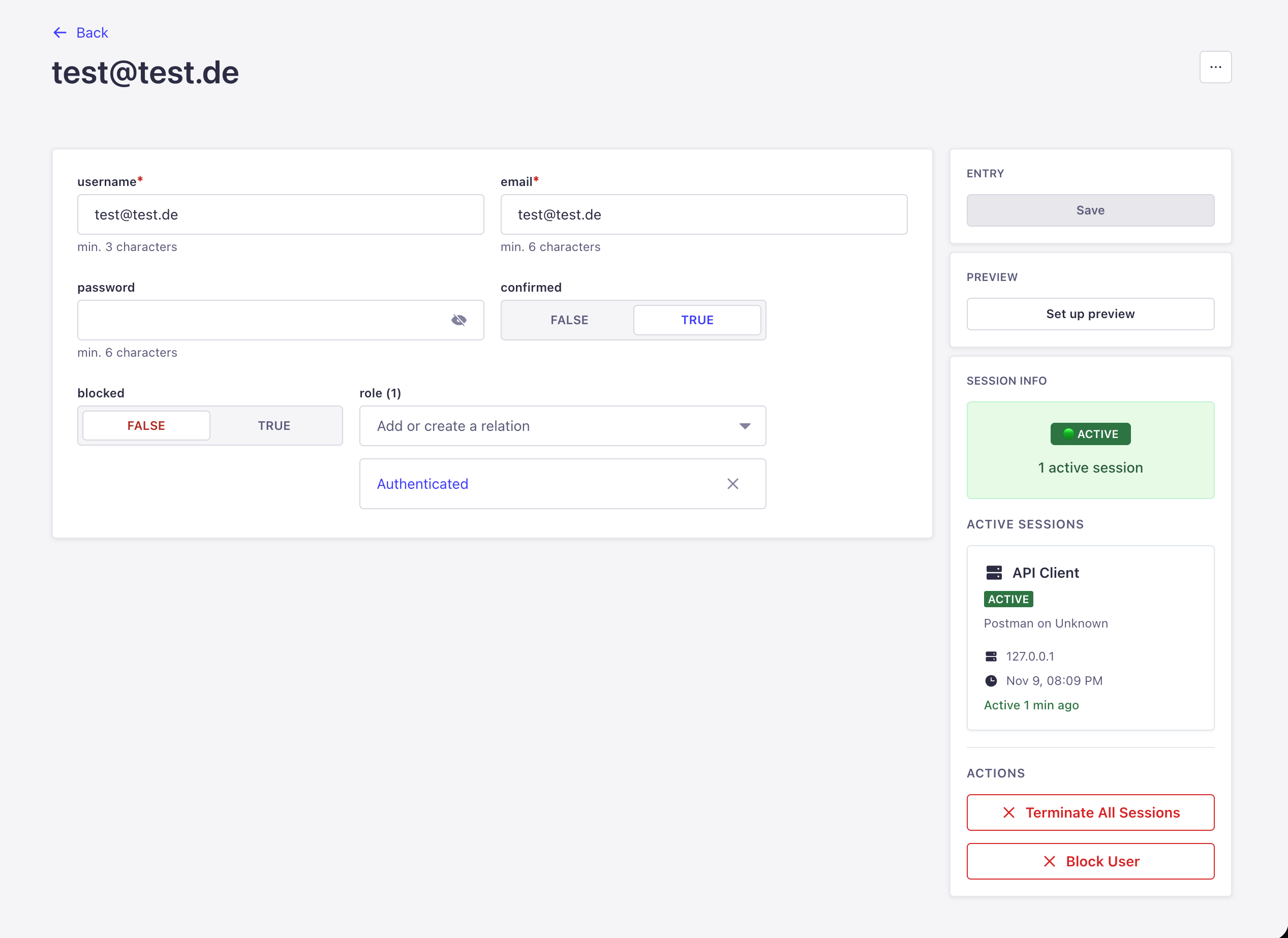 Content Manager sidebar integration
Quick Install
Step 1: Install
npm install strapi-plugin-magic-sessionmanagerStep 2: Enable Plugin
Add to config/plugins.ts:
export default () => ({
  'magic-sessionmanager': {
    enabled: true,
  },
});
Step 3: Rebuild & Start
npm run build
npm run develop
Step 4: Open Dashboard
- Go to Strapi Admin:
http://localhost:1337/admin - Look in the left sidebar for "Sessions"
- Click it!
- You'll see the dashboard
- That's it! You're done! 🎉
What This Plugin Does
Simple Version
When users login:
- Plugin saves who logged in, when, and from where
- You can see them in the dashboard
- You can force-logout anyone anytime
When users logout:
- Plugin marks their session as "logged out"
- They disappear from the active sessions list
While users are active:
- Plugin updates their "last seen" time
- You always know who's currently using your app
Main Features
1. See Who's Logged In
Dashboard Tab:
- Shows all active users
- Green badge = currently online
- Gray badge = logged out
- Click to see details
2. Force Logout Anyone
Need to kick someone out?
- Find their session
- Click "Terminate"
- Done! They're logged out immediately
Even works if they have refresh tokens!
3. Session Details
Click any session to see:
- When they logged in
- Last time they did something
- What browser/device they use
- Their IP address
- Location (if Premium)
4. Multiple Devices
Users can login from:
- Desktop computer
- Phone
- Tablet
- All at the same time!
Each login = separate session. You can see them all and logout each individually.
5. Homepage Widget
Quick stats widget shows:
- Online users count
- Active in last 15/30 minutes
- Total users
- Blocked users
- No need to navigate anywhere!
Security Features
Encryption Key (Recommended)
Your JWT tokens are encrypted before saving to database.
Generate in Admin Panel:
- Go to Sessions → Settings
- Scroll to "JWT Encryption Key Generator"
- Click "Generate Key"
- Click "Copy for .env"
- Paste into your
.envfile - Restart Strapi
Why? If someone hacks your database, they can't steal user sessions! 🔒
Refresh Token Protection (Advanced)
The Problem (Without This Plugin)
Admin kicks out a user
   ↓
User has "refresh token"
   ↓
User gets new login token automatically
   ↓
User is back in! 😱
The Solution (With This Plugin)
Admin kicks out a user
   ↓
User tries to use refresh token
   ↓
Plugin blocks it! 🚫
   ↓
User MUST login again
Premium Features
IP Geolocation
See where users login from:
- Country (with flag)
- City
- ISP Provider
- Coordinates (for map)
VPN/Proxy Detection
Automatically detect:
- VPN connections
- Proxy servers
- TOR exit nodes
- Datacenter IPs
Advanced Features
Threat Detection
Automatically check if IP is:
- Known threat source
- Botnet member
- Spam source
- Security score (0-100)
Geo-Fencing (Country Allow/Block Lists)
Control access by country:
// Example: Only allow specific countries
allowedCountries: ['DE', 'AT', 'CH', 'US', 'GB']

// Example: Block specific countries
blockedCountries: ['CN', 'RU', 'KP']
Configure in Admin Panel:
- Go to Sessions → Settings
- Scroll to "Geo-Fencing"
- Add countries to allow or block list
- Save settings
Auto-Blocking Rules
Automatically block sessions when:
- VPN/Proxy detected
- Country not in allow list
- Security score below threshold
- Known threat IP
Configure blocking behavior:
| Setting | Description | Default |
|---|---|---|
| Block VPNs | Reject logins from VPN IPs | Off |
| Block Proxies | Reject logins from proxy servers | Off |
| Block TOR | Reject TOR exit node IPs | Off |
| Min Security Score | Block if score below (0-100) | 0 (disabled) |
| Country Whitelist | Only allow listed countries | Empty (allow all) |
| Country Blacklist | Block listed countries | Empty (block none) |
Email/Webhook Notifications
Get alerts when:
- Suspicious login detected
- VPN/Proxy used
- Login from new country
- Blocked login attempt
- Security score below threshold
Webhook Integration:
// Discord webhook example
webhookUrl: 'https://discord.com/api/webhooks/...'

// Slack webhook example
webhookUrl: 'https://hooks.slack.com/services/...'
Email Alerts Setup
The Session Manager uses Strapi's Email Plugin for notifications.
Step 1: Install Email Provider
npm install @strapi/provider-email-nodemailerStep 2: Configure Email
Add to config/plugins.ts:
export default () => ({
  email: {
    config: {
      provider: 'nodemailer',
      providerOptions: {
        host: process.env.SMTP_HOST || 'smtp.gmail.com',
        port: process.env.SMTP_PORT || 587,
        auth: {
          user: process.env.SMTP_USER,
          pass: process.env.SMTP_PASSWORD,
        },
      },
    },
  },
  'magic-sessionmanager': {
    enabled: true,
  },
});
Step 3: Enable in Admin
- Go to Sessions → Settings
- Toggle "Enable Email Alerts" to ON
- Customize email templates
- Click Save
Pricing
| Feature | Free | Premium | Advanced |
|---|---|---|---|
| Session Tracking | ✅ | ✅ | ✅ |
| Force Logout | ✅ | ✅ | ✅ |
| Dashboard Widget | ✅ | ✅ | ✅ |
| Device Detection | ✅ | ✅ | ✅ |
| JWT Encryption | ✅ | ✅ | ✅ |
| IP Geolocation | ❌ | ✅ | ✅ |
| VPN/Proxy Detection | ❌ | ✅ | ✅ |
| Security Risk Scoring | ❌ | ✅ | ✅ |
| Threat Detection | ❌ | ❌ | ✅ |
| Geo-Fencing (Country Lists) | ❌ | ❌ | ✅ |
| Auto-Blocking Rules | ❌ | ❌ | ✅ |
| Email/Webhook Alerts | ❌ | ❌ | ✅ |
Next Steps
- Installation Guide - Complete setup instructions for all MagicDX plugins
- Pricing Details - View all pricing tiers and what's included
- Compare Plugins - See how Magic-Sessionmanager compares to other MagicDX plugins
- GitHub Repository - Full source code & detailed documentation
Get Magic-Sessionmanager
Start monitoring your users today. Free tier available!
No credit card required · Free tier forever
Related Plugins
Perfect Together:
- 🔗 Magic-Link - Passwordless authentication with session tracking
- 📧 Magic-Mail - Send security alerts via email
- 🔖 Magic-Mark - Bookmark session filters and queries
Support & Resources
- 📖 Full Documentation - Complete plugin guide
- 🐛 Report a Bug - GitHub Issues
- 💡 Request a Feature - Feature discussions
- 📧 Email Support - Direct support
Made by Joulee Tech GmbH
Magic-Sessionmanager - See who's online, control their sessions