
Magic-Mail
Professional-grade multi-account email management with smart routing, OAuth 2.0 support, and complete security compliance


📖 Quick Navigation
- 🌟 Overview - Features and capabilities
- 🚀 Quick Start - Get running in 5 minutes
- 📧 Email Providers - All 6 providers
- 💡 Email Sending - 3 methods with code
- 🎯 Smart Routing - Automatic routing setup
- 🔧 Configuration - Advanced settings
- 🔧 Advanced Features - Rate limiting, failover
- 🐛 Troubleshooting - Common issues & fixes
- 📡 API Reference - Developer reference
- 📚 Best Practices - Production strategies
- 🛡️ Security - Encryption & compliance
- 🎁 Pricing - All tiers
- 📚 Documentation Index - Full structure
Overview
Stop fighting with .env files and email configuration! MagicMail brings enterprise email management to Strapi v5 with a beautiful admin interface, multiple provider support, and intelligent routing.
Key Features
- ✅ 6 Email Providers - Gmail, Microsoft 365, Yahoo, SMTP, SendGrid, Mailgun
- ✅ OAuth 2.0 Authentication - No passwords needed for Gmail, Microsoft, Yahoo
- ✅ Smart Routing Rules - Route emails by type, recipient, subject, or custom conditions
- ✅ Automatic Failover - Never lose an email when rate limits hit
- ✅ Beautiful Admin UI - Manage everything from Strapi Admin Panel
- ✅ Zero Configuration - No .env files, everything in the database
- ✅ Email Designer Compatible - Works seamlessly with strapi-plugin-email-designer-5
- ✅ GDPR/CAN-SPAM Compliant - Built-in List-Unsubscribe headers
Screenshots
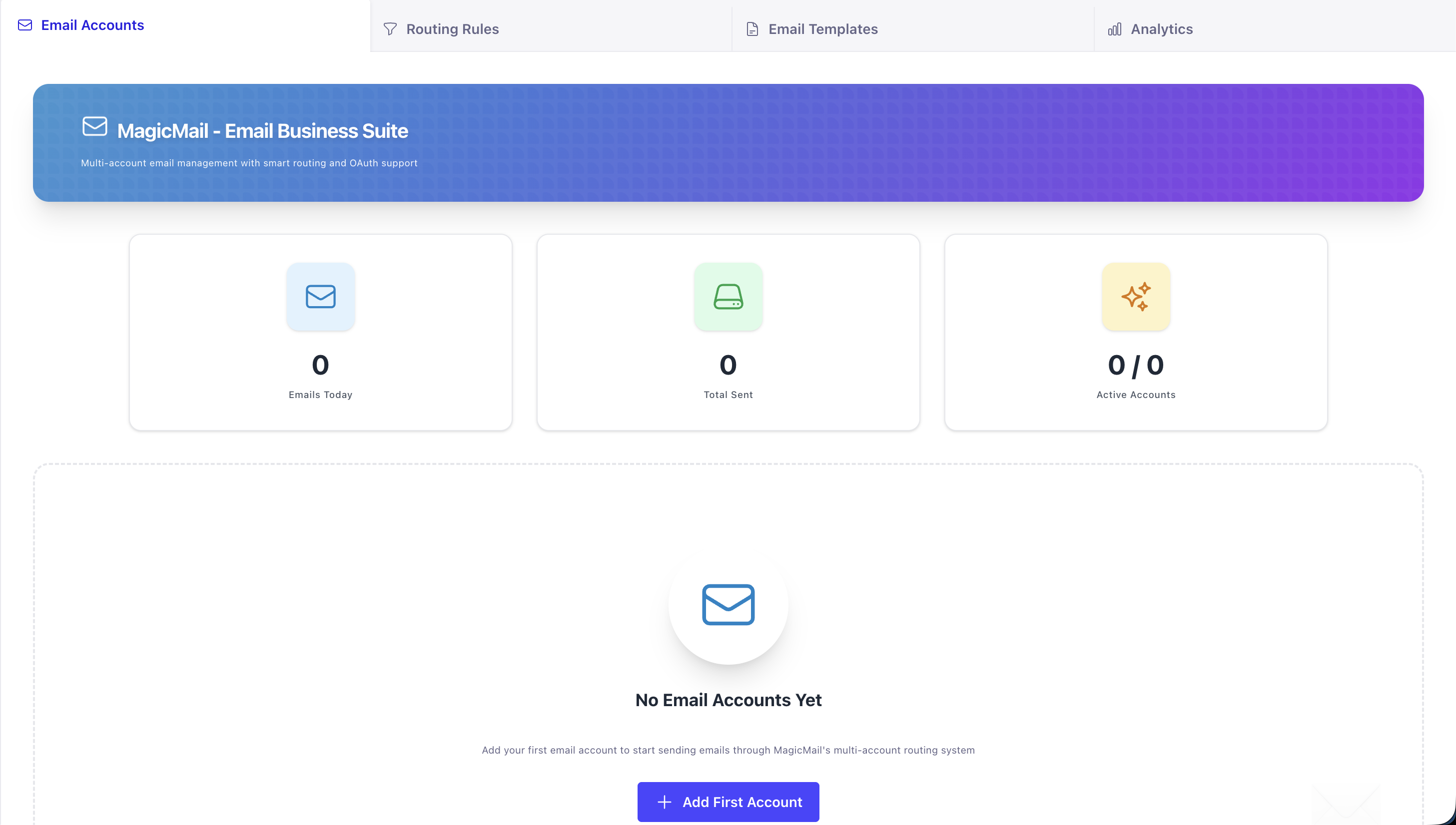 Manage unlimited email accounts with live stats and real-time monitoring
 Choose from 6 different email providers with OAuth 2.0 support
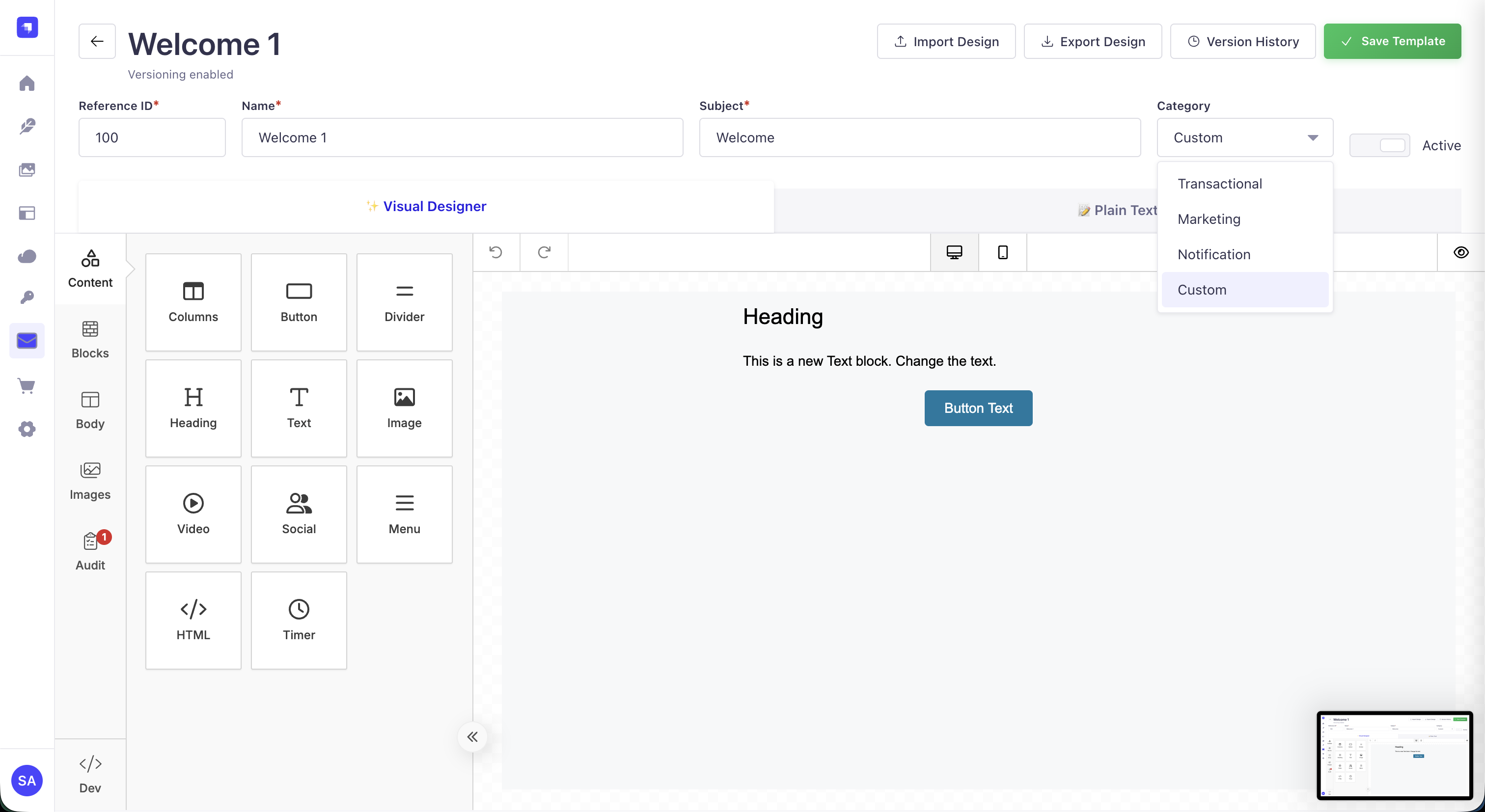 Drag-and-drop email editor with real-time preview
Quick Start
Installation
npm install strapi-plugin-magic-mail
# or
yarn add strapi-plugin-magic-mail
Enable Plugin
Create or update config/plugins.ts:
export default () => ({
  'magic-mail': {
    enabled: true,
  },
});
Build & Start
npm run build
npm run develop
Add Your First Email Account
- Navigate to Admin Panel → MagicMail → Email Accounts
- Click "Add Account"
- Choose your provider (Gmail OAuth, SMTP, etc.)
- Fill in credentials
- Click "Test" to verify
- Done! 🎉
Supported Email Providers
| Provider | Type | Authentication | Features |
|---|---|---|---|
| Gmail | OAuth 2.0 | Google OAuth | Gmail API, Attachments, Auto DKIM |
| Microsoft 365 | OAuth 2.0 | Azure AD | Graph API, Attachments, Tenant Support |
| Yahoo Mail | OAuth 2.0 | Yahoo OAuth | SMTP OAuth2, Attachments |
| SMTP | Credentials | Username/Password | Universal, DKIM Optional, Custom Servers |
| SendGrid | API Key | SendGrid API | Transactional, Marketing, Templates |
| Mailgun | API Key | Mailgun API | Bulk Sending, Analytics |
Simple Email Sending
Method 1: Strapi Native (Recommended!)
MagicMail automatically intercepts Strapi's email service - no code changes needed!
// This works in ANY Strapi plugin or controller:
await strapi.plugin('email').service('email').send({
  to: 'user@example.com',
  subject: 'Welcome to Our Platform!',
  text: 'Plain text version',
  html: '<h1>Welcome!</h1><p>Thanks for signing up!</p>',
});

// ✅ MagicMail automatically:
// - Selects best account (via routing rules or priority)
// - Checks rate limits
// - Handles failover if needed
// - Logs the email
// - Updates statistics
Method 2: Direct MagicMail API
// Force a specific account
await strapi.plugin('magic-mail').service('email-router').send({
  to: 'customer@example.com',
  subject: 'Order Confirmation',
  html: '<h1>Your Order #12345</h1>',
  accountName: 'SendGrid Marketing', // Force this account
  type: 'transactional',
  priority: 'high',
});
Sending with Attachments
await strapi.plugin('email').service('email').send({
  to: 'customer@example.com',
  subject: 'Invoice #12345',
  html: '<h1>Invoice Attached</h1>',
  attachments: [
    {
      filename: 'invoice.pdf',
      path: './uploads/invoice-12345.pdf',
    },
  ],
});
🎯 Use Cases
Multi-Tenant SaaS
// Each tenant gets their own email account
// Route by custom field
await strapi.plugin('email').service('email').send({
  to: 'customer@example.com',
  subject: 'Order Confirmation',
  html: '<h1>Order #456</h1>',
  customField: 'tenant-123', // Matches routing rule
});
High-Volume Email Sending
// Distribute load across multiple accounts
// Account 1: Priority 10, Limit 500/day
// Account 2: Priority 9, Limit 500/day
// Account 3: Priority 8, Limit 500/day
// → Total: 1500 emails/day with automatic load balancing!
Marketing Campaigns
// Route marketing emails via SendGrid
await strapi.plugin('email').service('email').send({
  to: 'subscriber@example.com',
  subject: 'Weekly Newsletter',
  html: template,
  type: 'marketing',
  unsubscribeUrl: 'https://yoursite.com/unsubscribe?id=123',
});
// ✅ Automatically routes via SendGrid
// ✅ Adds List-Unsubscribe header
// ✅ GDPR/CAN-SPAM compliant
Configuration
Database Configuration
Magic-Mail stores all email accounts securely in your Strapi database. No .env files needed!
Add to config/plugins.ts:
export default () => ({
  'magic-mail': {
    enabled: true,
    config: {
      // Optional: Custom encryption key (recommended for production)
      encryptionKey: process.env.MAGIC_MAIL_ENCRYPTION_KEY,

      // Optional: Enable detailed logging
      debug: process.env.NODE_ENV === 'development',

      // Optional: Custom rate limit settings
      rateLimit: {
        enabled: true,
        window: 3600, // seconds
        maxRequests: 100,
      },
    },
  },
});
Environment Variables (Optional)
# Encryption key for stored credentials
MAGIC_MAIL_ENCRYPTION_KEY=your-32-character-hex-key

# Enable debug mode
DEBUG=magic-mail:*

# Custom Redis connection for rate limiting (optional)
REDIS_URL=redis://localhost:6379
Generating Encryption Key
# Generate a secure encryption key
node -e "console.log(require('crypto').randomBytes(16).toString('hex'))"
🎯 Smart Routing Rules
How Routing Rules Work
Route emails automatically based on conditions:
// In Magic-Mail Admin Panel:
// 1. Go to Settings → Routing Rules
// 2. Create rule:
//    - Name: "Marketing Emails"
//    - Condition: type === "marketing"
//    - Account: SendGrid Marketing
//    - Priority: 10
Routing Rule Examples
Example 1: Route by Email Type
Rule Name: Transactional Emails
Condition: type === "transactional"
Account: Gmail (high reliability)
Priority: 100
Example 2: Route by Recipient Domain
Rule Name: Enterprise Customers
Condition: to.endsWith("@enterprise.com")
Account: Microsoft 365 (enterprise support)
Priority: 90
Example 3: Route by Sender
Rule Name: Newsletter Emails
Condition: from.includes("newsletter")
Account: SendGrid (marketing features)
Priority: 80
Example 4: Failover Chain
Rule Name: High Volume
Condition: priority === "high"
Account: SendGrid (primary)
Fallback: Mailgun (secondary)
Priority: 95
Available Routing Conditions
type- Email type (transactional, marketing, notification, system)to- Recipient email addressfrom- Sender email addresssubject- Email subjectpriority- Email priority (high, normal, low)customField- Custom metadata fields
Advanced Features
Rate Limiting
Each email account has configurable rate limits:
Gmail Account:
- Per day: 500 emails
- Per hour: 50 emails
- Per minute: 5 emails

SendGrid Account:
- Per day: 10,000 emails
- Per hour: 1,000 emails
- Per minute: 100 emails
MagicMail automatically:
- Tracks sent emails in real-time
- Switches to failover account when limit approached
- Logs rate limit events
- Sends notifications
Automatic Failover
When an account hits rate limits:
SendGrid Primary (limit reached)
    ↓
Mailgun Fallback (takes over)
    ↓
SMTP Backup (last resort)
No emails lost! All queued emails retry automatically.
Email Logging & Analytics
All emails are logged with:
- Timestamp
- Recipient address
- Account used
- Delivery status
- Response time
- Error messages (if any)
Access logs:
- Admin Panel → Magic-Mail → Email Logs
- Filter by date, account, status
- See delivery statistics
Troubleshooting
Common Issues & Solutions
Issue 1: "OAuth Token Expired"
Error: Google OAuth token expired
Solution:
1. Go to Email Accounts
2. Click the account
3. Click "Re-authorize"
4. Follow Google OAuth flow
Issue 2: "Emails Not Sending"
Diagnosis steps:
1. Check Admin Panel → Email Logs
2. Look for error messages
3. Verify account credentials
4. Test account: click "Test" button
5. Check rate limits haven't been exceeded
Issue 3: "SMTP Connection Refused"
Solution:
1. Verify SMTP host & port (Gmail: smtp.gmail.com:587)
2. Enable "Less secure app access" (Gmail)
3. Check firewall allows outgoing port 587/25
4. Use TLS (not SSL) for most providers
Issue 4: "Magic-Mail Not Intercepting Emails"
Ensure:
1. Plugin enabled in config/plugins.ts
2. npm run build && npm run develop ran
3. At least one email account configured
4. Email account has "Active" status
5. Admin sidebar shows "Magic-Mail"
Issue 5: "403 Forbidden - SendGrid"
Solution:
1. Verify API key is correct (copy from SendGrid dashboard)
2. Check API key has "Mail Send" permission
3. Confirm API key is not revoked
4. Try creating new API key
Issue 6: "Attachments Not Working"
Not all providers support attachments equally:
✅ Works: Gmail, Microsoft 365, Yahoo, SMTP
⚠️ Limited: SendGrid (encoded only)
❌ Not supported: Mailgun (API limitation)

Solution: Use email provider with full attachment support
Enable Debug Mode
# Terminal
DEBUG=magic-mail:* npm run develop

# Logs:
# - All routing decisions
# - Account selection logic
# - Rate limit tracking
# - Email send attempts
Check Logs Location
# Docker
docker logs strapi-container | grep magic-mail

# Standard
# Check: /var/log/strapi/magic-mail.log
# or: your-strapi-dir/logs/magic-mail.log
Complete API Reference
Send Email Endpoint
Direct API Usage (Strapi Plugin Service):
// Method: Strapi Native (Recommended)
const emailService = strapi.plugin('email').service('email');

await emailService.send({
  to: 'user@example.com',
  cc: 'manager@example.com',
  bcc: 'archive@example.com',
  subject: 'Order Confirmation',
  text: 'Plain text fallback',
  html: '<h1>Thanks for your order!</h1>',
  replyTo: 'support@company.com',
});
Method 2: Direct Magic-Mail Service (For advanced routing)
const magicMailService = strapi.plugin('magic-mail').service('email-router');

await magicMailService.send({
  // Recipients
  to: 'user@example.com',
  cc: ['manager1@example.com', 'manager2@example.com'],
  bcc: ['archive@company.com'],

  // Content
  subject: 'Your Order #12345',
  text: 'Plain text version',
  html: '<h1>HTML version</h1>',
  replyTo: 'support@company.com',

  // Routing
  accountName: 'SendGrid Marketing', // Specific account
  type: 'marketing', // For routing rules
  priority: 'high', // high | normal | low

  // Attachments
  attachments: [
    {
      filename: 'invoice.pdf',
      path: './uploads/invoice-12345.pdf',
    },
    {
      filename: 'terms.txt',
      content: 'File content as string',
    },
  ],

  // Email ID for tracking
  messageId: 'order-12345-1234567890',

  // Custom metadata
  metadata: {
    orderId: '12345',
    customerId: 'cust-999',
    campaignId: 'summer-2025',
  },
});
Send with Email Template
await strapi.plugin('magic-mail').service('email-router').send({
  to: 'user@example.com',

  // Use saved template
  template: {
    id: 'welcome-email', // Template ID from Magic-Mail
    data: {
      firstName: 'John',
      lastName: 'Doe',
      companyName: 'Acme Corp',
      activationLink: 'https://app.example.com/activate?token=abc123',
    },
  },
});
Query Email Logs
// Get all sent emails
const logs = await strapi.db.query('magic-mail::email-log').findMany({
  limit: 100,
  offset: 0,
  orderBy: { createdAt: 'desc' },
});

// Get by status
const failedEmails = await strapi.db.query('magic-mail::email-log').findMany({
  where: { status: 'failed' },
  limit: 50,
});

// Get by account
const gmailEmails = await strapi.db.query('magic-mail::email-log').findMany({
  where: { accountName: 'Gmail' },
  limit: 100,
});
Webhook Events
Email events that trigger webhooks:
// Event: Email Sent Successfully
{
  event: 'email.sent',
  messageId: 'msg-12345',
  to: 'user@example.com',
  account: 'SendGrid',
  sentAt: '2025-01-15T10:30:00Z',
}

// Event: Email Failed
{
  event: 'email.failed',
  messageId: 'msg-12345',
  to: 'user@example.com',
  account: 'Gmail',
  error: 'Authentication failed',
  failedAt: '2025-01-15T10:30:00Z',
}

// Event: Rate Limit Hit
{
  event: 'account.rateLimitHit',
  account: 'SendGrid',
  limit: 10000,
  period: 'daily',
  hitAt: '2025-01-15T10:30:00Z',
}

// Event: Account Deactivated
{
  event: 'account.deactivated',
  account: 'Gmail',
  reason: 'OAuth token expired',
  deactivatedAt: '2025-01-15T10:30:00Z',
}
Best Practices
1. Email Routing Strategy
// ✅ Good: Use routing rules for different email types
// Transactional → Gmail (high reliability)
// Marketing → SendGrid (features)
// Notifications → SMTP Backup (lightweight)

// ❌ Bad: Send everything through one account
// - Risks hitting rate limits
// - No failover
// - No load balancing
2. Error Handling
// ✅ Good: Wrap in try-catch
try {
  await strapi.plugin('email').service('email').send({
    to: user.email,
    subject: 'Welcome!',
    html: template,
  });
} catch (error) {
  console.error('Email failed:', error.message);
  // Log to external service
  // Retry later
  // Notify admin
}

// ❌ Bad: Fire and forget
strapi.plugin('email').service('email').send({...});
3. Rate Limiting Strategy
// ✅ Good: Multiple accounts for high volume
// Account 1: 500/day
// Account 2: 500/day
// Account 3: 500/day
// Total capacity: 1500/day

// ❌ Bad: Single account for high volume
// Hits limit quickly
// No failover
4. Template Management
// ✅ Good: Store templates in Magic-Mail
// - Easy to update in Admin Panel
// - Version history
// - Re-use across projects

// ❌ Bad: Template in code
// - Hard to update
// - Deployment needed for changes
// - No version control
5. OAuth Token Refresh
// ✅ Good: Setup automatic re-authorization
// Check: Admin Panel → Settings → OAuth
// Enable: Auto-refresh tokens

// ❌ Bad: Let tokens expire
// - Emails stop sending
// - Manual re-authorization needed
// - Service interruption
6. Monitoring
// ✅ Good: Monitor these metrics
// - Daily email count
// - Failed email count
// - Rate limit usage
// - Response times
// - OAuth token expiry

// ❌ Bad: No monitoring
// - Discover issues when users complain
// - No advance warning
🎓 Example: Complete Setup Flow
Goal: Send transactional emails from multiple providers with automatic failover
Step 1: Install & Enable
npm install strapi-plugin-magic-mail
npm run build && npm run develop
Step 2: Add Email Accounts
- Gmail Account (OAuth)
- SendGrid Account (API Key)
- SMTP Fallback
Step 3: Create Routing Rules
- Rule 1: type="transactional" → Gmail
- Rule 2: type="transactional" + priority="high" → SendGrid
- Fallback: SMTP
Step 4: Send Emails
await strapi.plugin('email').service('email').send({
  to: user.email,
  subject: 'Welcome!',
  html: '<h1>Thanks!</h1>',
  type: 'transactional',
});
// Automatically routes to Gmail or SendGrid based on rules
Step 5: Monitor
- Admin Panel → Magic-Mail → Email Logs
- Check success rate
- Monitor rate limits
Design beautiful emails visually with the integrated email designer!
| Feature | FREE | PREMIUM | ADVANCED |
|---|---|---|---|
| Visual Designer | ✅ Basic | ✅ + library | ✅ Pro components |
| Templates | 25 | 100 | 500 |
| Drag & Drop | ✅ | ✅ | ✅ |
| Mustache Variables | ✅ | ✅ | ✅ |
| Version History | ❌ | ✅ | ✅ |
| Analytics | ❌ | Basic | Advanced |
| A/B Testing | ❌ | ❌ | ✅ |
Creating Templates
// Send email using template
await strapi.plugin('magic-mail').service('email-router').send({
  to: 'user@example.com',
  templateId: 100, // Your template reference ID
  templateData: {
    user: {
      firstName: 'John',
      lastName: 'Doe',
    },
    orderNumber: '12345',
    orderTotal: '$199.99',
  },
});
Security Features
Credential Encryption
All sensitive data is encrypted using AES-256-GCM before storage:
| Data Type | Encryption | Storage |
|---|---|---|
| SMTP Passwords | AES-256-GCM | Encrypted in database |
| OAuth Access Tokens | AES-256-GCM | Encrypted in database |
| OAuth Refresh Tokens | AES-256-GCM | Encrypted in database |
| API Keys (SendGrid, Mailgun) | AES-256-GCM | Encrypted in database |
Setup Encryption Key:
# Generate a secure 32-character hex key
openssl rand -hex 32

# Add to .env file
MAGIC_MAIL_ENCRYPTION_KEY=your-64-character-hex-key
Without encryption key: Credentials are still protected using Strapi's built-in encryption, but a custom key is recommended for production.
Transport Security
- ✅ TLS 1.2+ enforced (SMTP connections)
- ✅ Certificate verification enabled by default
- ✅ HTTPS only for API providers (SendGrid, Mailgun, Brevo)
- ✅ Secure OAuth flows with state verification
Email Authentication
- ✅ DKIM signing (automatic for OAuth, optional for SMTP)
- ✅ SPF validation support
- ✅ DMARC compliance
Compliance
- ✅ GDPR - List-Unsubscribe header included
- ✅ CAN-SPAM - One-click unsubscribe support
- ✅ RFC 5322 - Proper email format validation
Pricing
| Feature | Free | Premium | Advanced |
|---|---|---|---|
| Email Accounts | 3 | Unlimited | Unlimited |
| All 6 Providers | ✅ | ✅ | ✅ |
| Smart Routing | ✅ | ✅ | ✅ |
| Templates | 25 | 100 | 500 |
| Version History | ❌ | ✅ | ✅ |
| Analytics | ❌ | Basic | Advanced |
| Priority Support | ❌ | ❌ | ✅ |
Complete Documentation Index
This documentation covers everything you need to get started with Magic-Mail:
- Overview - Features and capabilities
- Quick Start - Installation and basic setup (5 minutes)
- Email Providers - All 6 supported providers
- Email Sending - 3 methods with examples
- Use Cases - Real-world scenarios
- Email Designer - Template system features
- Configuration - Advanced settings
- Smart Routing - Automatic email routing rules
- Advanced Features - Rate limiting, failover, logging
- Troubleshooting - Common issues and solutions
- API Reference - Complete developer reference
- Best Practices - Production-ready strategies
- Security - Encryption and compliance
- Pricing - All tiers and features
Next Steps:
- New to Magic-Mail? → Start with Quick Start
- Setting up? → Go to Configuration
- Building something? → Check API Reference
- Having issues? → See Troubleshooting
- Want best practices? → Read Best Practices
Get Magic-Mail
Ready to supercharge your email management? Magic-Mail is completely free to get started!
No credit card required · Free tier forever · 30-day money-back guarantee
Related Plugins
Perfect Together:
- 🔗 Magic-Link - Passwordless authentication for sending magic link emails
- 🔐 Magic-Sessionmanager - Track user sessions and send security alerts
- 🔖 Magic-Mark - Bookmark email templates and queries
💬 Support & Resources
- 📖 Full Documentation - Complete plugin guide
- 🐛 Report a Bug - GitHub Issues
- 💡 Request a Feature - Feature discussions
- 📧 Email Support - Direct support
Made with ❤️ by Schero D.
MagicMail - Because email management should be magical, not painful. ✨