
Magic-Link
The most advanced passwordless authentication plugin for Strapi v5



Overview
Secure, modern, and user-friendly authentication using email-based magic links, OTP codes, and TOTP authenticators. Built for production with enterprise-grade security features.
Key Features
- ⚡ Zero Setup Time - Install, activate license (free), and start using
- 🎯 Production Ready - Battle-tested with rate limiting, IP bans, and session management
- 🛡️ Multi-Factor Authentication - Email OTP + TOTP Authenticator support
- 🎨 Beautiful UI - Modern, responsive admin interface
- 🔒 Professional Security - License-based feature unlocking with Free, Premium & Advanced tiers
- 🌍 5 Languages - English, Deutsch, Français, Español, Português
Screenshots
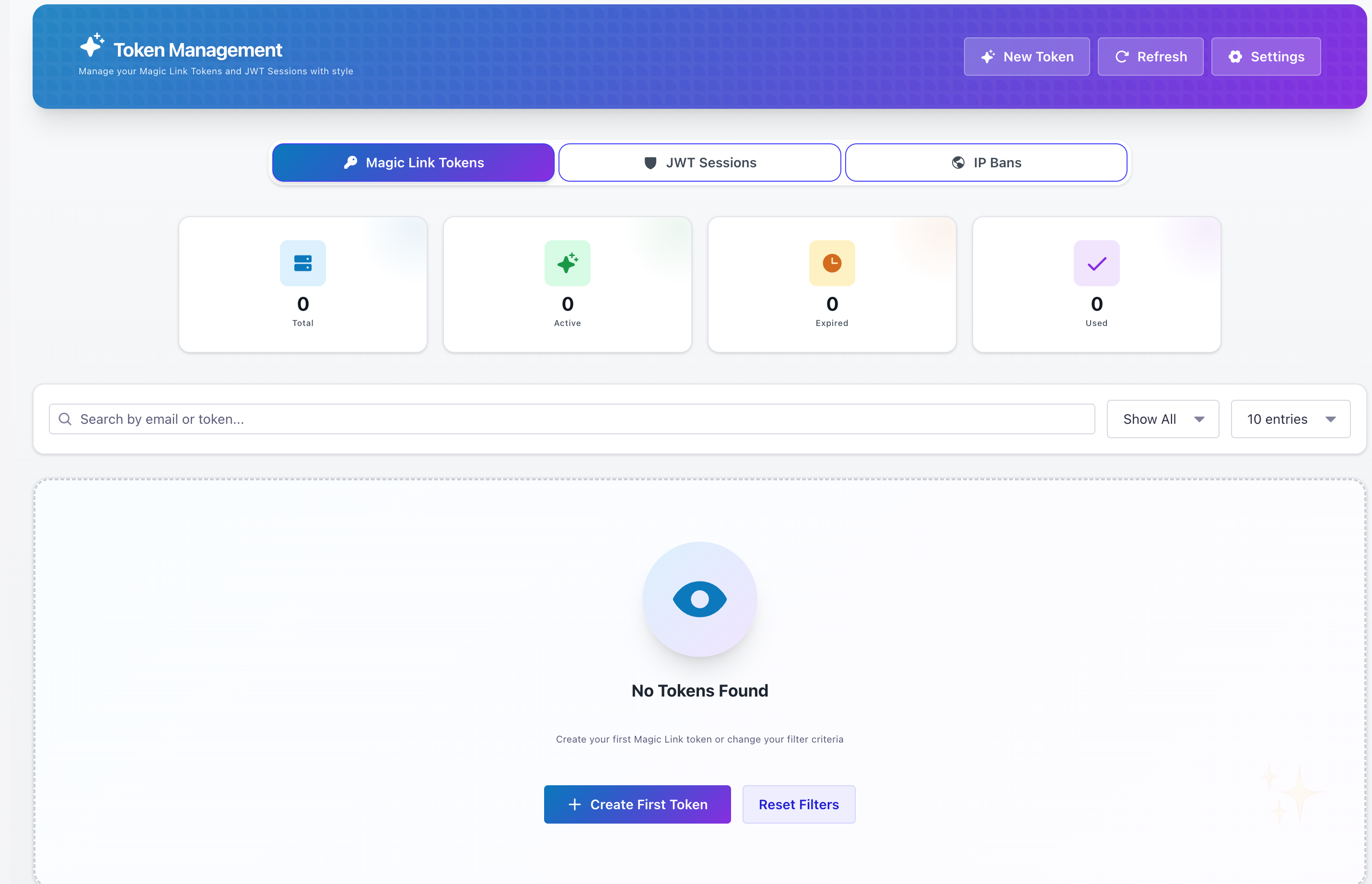 Professional interface for managing magic link tokens
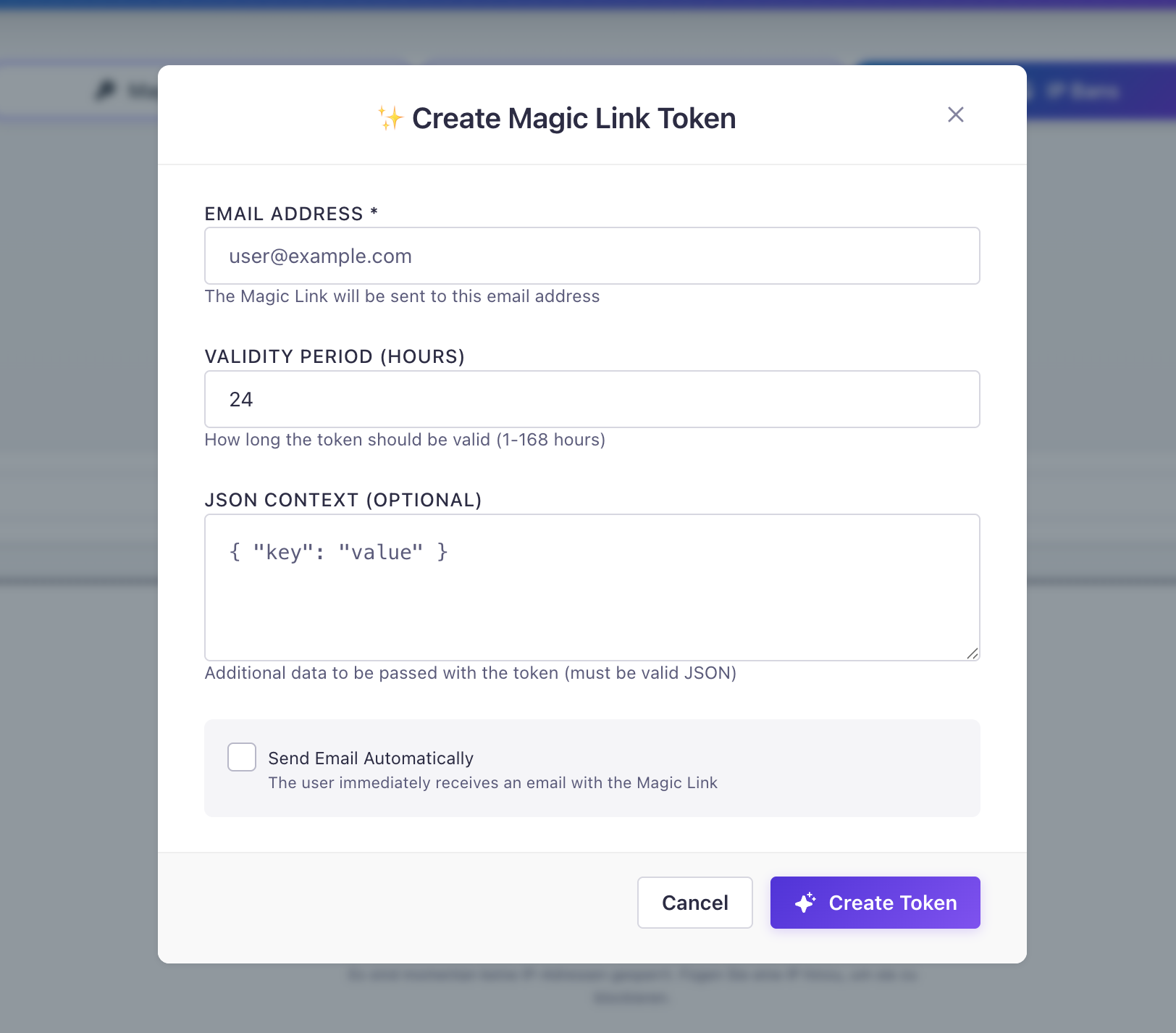 Simple modal to create tokens with custom TTL
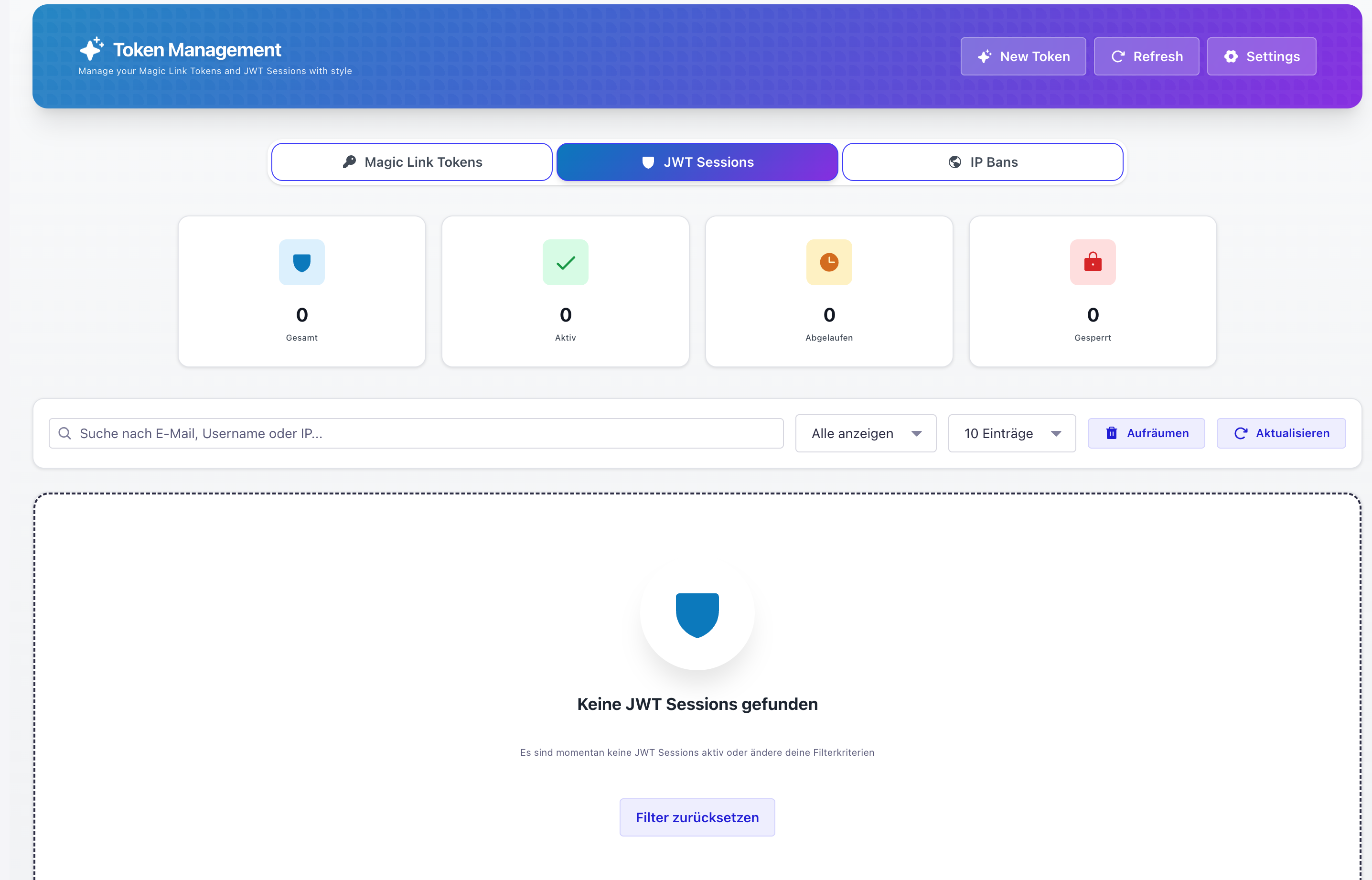 Monitor and manage all active JWT sessions
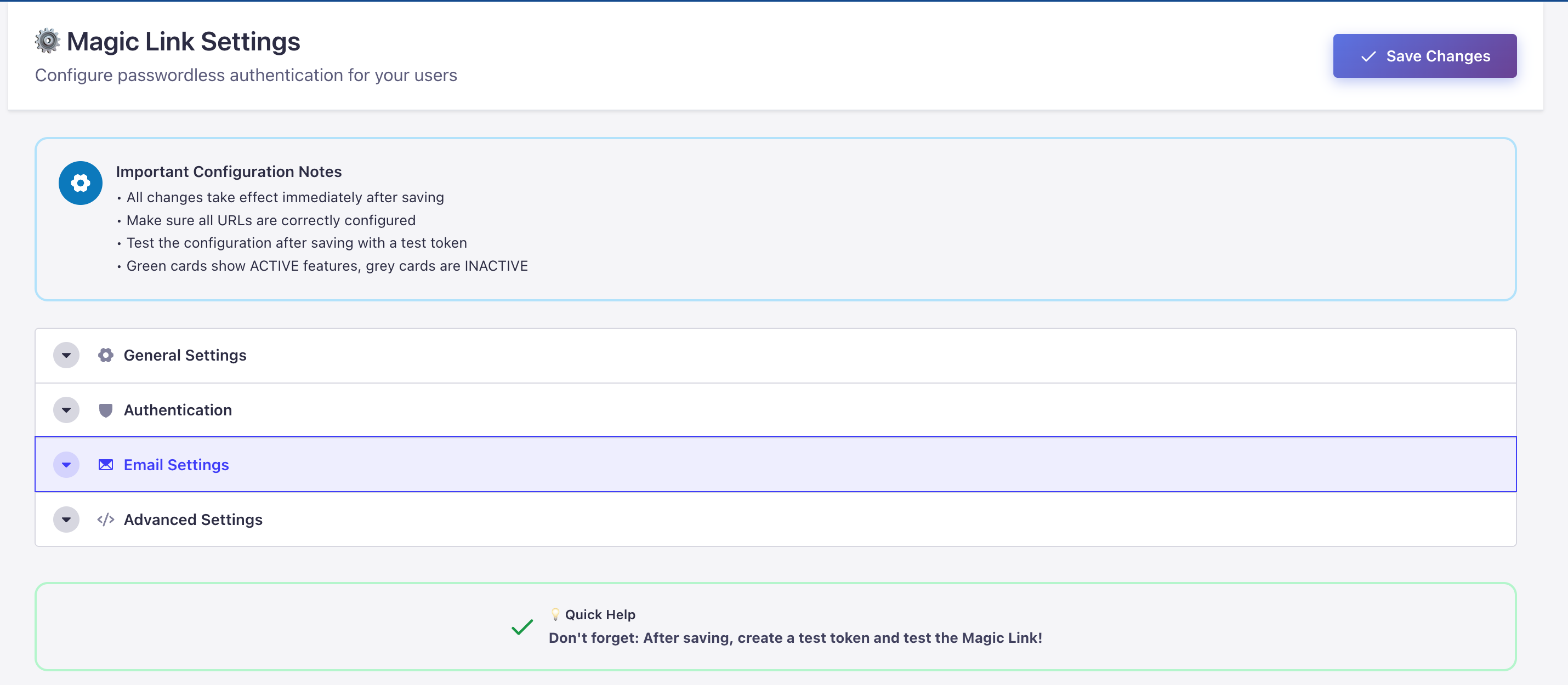 Comprehensive settings panel with modern UI
Authentication Modes
Choose the security level that fits your needs:
| Mode | Description | License |
|---|---|---|
| Magic Link Only | One-click email login - fast & user-friendly | ✅ Free |
| Magic Link + Email OTP | 6-digit code after magic link click | 💎 Premium |
| Magic Link + TOTP (MFA) | Authenticator app (Google Auth, Authy) | ⚡ Advanced |
| TOTP-Only Login | Direct login with email + TOTP code | ⚡ Advanced |
Quick Start
Installation
# Using npm
npm install strapi-plugin-magic-link-v5

# Using yarn
yarn add strapi-plugin-magic-link-v5
Enable Plugin
Add to config/plugins.ts:
export default () => ({
  'magic-link': {
    enabled: true,
    config: {
      // Context field control for security
      context_whitelist: [], // Only allow these fields (empty = all)
      context_blacklist: ['password', 'secret', 'apiKey', 'token'],
    },
  },
});
Environment Variables (.env)
# ===== TOKEN & SECRET ENCRYPTION =====
# Primary encryption key for tokens and TOTP secrets
# REQUIRED for production! 32+ characters recommended
MAGIC_LINK_ENCRYPTION_KEY=your-32-character-secret-key-here

# Fallback encryption keys (Strapi defaults - used if above not set)
# APP_KEYS=key1,key2,key3,key4
# API_TOKEN_SALT=your-api-token-salt
# ADMIN_JWT_SECRET=your-admin-jwt-secret

# ===== OTP SECURITY =====
# Pepper for OTP code hashing (adds extra security layer)
# Used with SHA256 for timing-safe comparison
OTP_PEPPER=your-otp-pepper-secret-string

# ===== URL CONFIGURATION =====
# Frontend URL for magic link redirects (where users click the link)
FRONTEND_URL=https://yourfrontend.com

# Strapi base URL for API endpoints
URL=https://yourstrapi.com
Production Security
Never commit .env to version control!
Generate secure keys:
# Encryption key (32 bytes hex)
node -e "console.log(require('crypto').randomBytes(32).toString('hex'))"

# OTP Pepper (16 bytes hex)
node -e "console.log(require('crypto').randomBytes(16).toString('hex'))"| Variable | Purpose | Required |
|---|---|---|
MAGIC_LINK_ENCRYPTION_KEY | Encrypts tokens & TOTP secrets | Production |
OTP_PEPPER | Adds pepper to OTP hashing | Recommended |
FRONTEND_URL | Magic link redirect destination | Yes |
URL | Strapi API base URL | Yes |
Build & Start
npm run build
npm run develop
Activate License (First Time)
- Go to Admin → Magic-Link
- Click "Activate License"
- Enter your details (completely free!)
- Click "Create License"
- Done! Plugin is ready ✅
💻 Frontend Implementation
🔗 Basic Magic Link Flow
Step 1: Request a magic link
const response = await fetch('/api/magic-link/send-link', {
  method: 'POST',
  headers: { 'Content-Type': 'application/json' },
  body: JSON.stringify({
    email: 'user@example.com',
    context: { redirectTo: '/dashboard' }
  })
});

console.log('Magic link sent!');
Step 2: Verify token on callback page
const urlParams = new URLSearchParams(window.location.search);
const loginToken = urlParams.get('loginToken');

if (loginToken) {
  const response = await fetch(`/api/magic-link/login?loginToken=${loginToken}`);
  const { jwt, user } = await response.json();

  // Store JWT for authenticated requests
  localStorage.setItem('token', jwt);
  localStorage.setItem('user', JSON.stringify(user));

  // Redirect to dashboard
  window.location.href = '/dashboard';
}
📧 Email OTP Flow (Premium)
Verify OTP code:
async function verifyOTP(email, otpCode) {
  const response = await fetch('/api/magic-link/verify-otp', {
    method: 'POST',
    headers: { 'Content-Type': 'application/json' },
    body: JSON.stringify({
      email: email,
      otp: otpCode
    })
  });

  if (response.ok) {
    const { jwt, user } = await response.json();
    localStorage.setItem('token', jwt);
    window.location.href = '/dashboard';
  }
}
🔐 TOTP Setup Flow (Advanced)
Setup TOTP for user:
async function setupTOTP() {
  const token = localStorage.getItem('token');

  const response = await fetch('/api/magic-link/totp/setup', {
    method: 'POST',
    headers: {
      'Authorization': `Bearer ${token}`,
      'Content-Type': 'application/json'
    }
  });

  const { secret, qrCode, otpauthUrl } = await response.json();

  // Display QR code to user
  document.getElementById('qr-code').innerHTML = `<img src="${qrCode}" />`;

  return secret;
}
Verify TOTP code:
async function verifyTOTP(totpCode) {
  const token = localStorage.getItem('token');

  const response = await fetch('/api/magic-link/totp/verify', {
    method: 'POST',
    headers: {
      'Authorization': `Bearer ${token}`,
      'Content-Type': 'application/json'
    },
    body: JSON.stringify({
      token: totpCode
    })
  });

  return response.ok;
}
Security Features
Core Security
- Rate Limiting - 5 requests per 15 minutes (configurable)
- IP Banning - Block suspicious addresses with one click
- Session Management - Monitor and revoke active JWT sessions
- Token Expiration - Configurable validity periods
- Brute Force Protection - Login attempt limiting
Token & Secret Encryption
All sensitive data is hashed or encrypted before storage:
| Data Type | Method | Details |
|---|---|---|
| Magic Link Tokens | SHA256 Hash + Salt | Never stored in plaintext |
| Email OTP Codes | SHA256 Hash + Pepper | Timing-safe comparison |
| TOTP Secrets | AES-256-GCM | Encrypted at rest |
| Backup Codes | SHA256 Hash | One-way hash |
Why hashing? Even if your database is compromised, attackers cannot use the stored tokens - they only see hashes!
Context Field Control (Whitelist/Blacklist)
Filter sensitive data from token context:
// config/plugins.ts
export default () => ({
  'magic-link': {
    enabled: true,
    config: {
      // Only allow these fields in context (empty = allow all)
      context_whitelist: ['redirectTo', 'role', 'locale'],

      // Always remove these fields from context
      context_blacklist: ['password', 'secret', 'apiKey', 'token'],
    },
  },
});
Default Blacklist: password, secret, apiKey, token are always removed!
Use cases:
- Prevent accidental storage of sensitive data
- Limit what frontend can pass to magic links
- GDPR compliance - don't store unnecessary data
Authentication Security
- Magic Link - Unique tokens with expiration
- Email OTP - 6-digit codes with max attempts
- TOTP MFA - Time-based one-time passwords
JWT Blacklist (Session Revocation)
Revoke compromised or unwanted sessions instantly:
| Feature | Description |
|---|---|
| Instant Revocation | Blacklist JWT tokens immediately |
| Automatic Cleanup | Expired blacklist entries auto-removed |
| Admin Dashboard | View and manage blacklisted tokens |
| API Access | Programmatic blacklist management |
How it works:
// User logs out - JWT is blacklisted
await fetch('/api/magic-link/logout', {
  method: 'POST',
  headers: { 'Authorization': `Bearer ${jwt}` }
});
// Token is now invalid even before expiration

// Admin revokes user session
await fetch('/magic-link/jwt-sessions/:id/revoke', {
  method: 'POST',
  headers: { 'Authorization': `Bearer ${adminJwt}` }
});
Blacklist is checked on every authenticated request - revoked tokens cannot be used!
IP Ban Management
Block malicious IPs with one click:
// Ban an IP address
POST /magic-link/ban-ip
{
  "ip": "192.168.1.100",
  "reason": "Suspicious activity"
}

// Unban an IP address
DELETE /magic-link/ban-ip/:ip
View banned IPs in Admin Panel:
- Go to Magic-Link → Settings
- Click "Banned IPs" tab
- See all blocked addresses with ban reason
Compliance
- GDPR Ready - Privacy-focused design
- Security Score - Real-time configuration assessment
- Audit Logs - Track all authentication events
Pricing
| Feature | Free | Premium | Advanced |
|---|---|---|---|
| Magic Link Login | ✅ | ✅ | ✅ |
| Token Management | ✅ | ✅ | ✅ |
| IP Banning | ✅ | ✅ | ✅ |
| Rate Limiting | ✅ | ✅ | ✅ |
| Token Hashing (SHA256) | ✅ | ✅ | ✅ |
| Context Whitelist/Blacklist | ✅ | ✅ | ✅ |
| JWT Blacklist | ✅ | ✅ | ✅ |
| Email OTP | ❌ | ✅ | ✅ |
| OTP Hashing (SHA256+Pepper) | ❌ | ✅ | ✅ |
| TOTP Authenticator (MFA) | ❌ | ❌ | ✅ |
| TOTP Secret Encryption (AES-256) | ❌ | ❌ | ✅ |
| TOTP-Only Login | ❌ | ❌ | ✅ |
| Backup Codes | ❌ | ❌ | ✅ |
API Endpoints
Public Endpoints (No Auth Required)
| Method | Endpoint | Description |
|---|---|---|
POST | /api/magic-link/send-link | Generate and send magic link |
GET | /api/magic-link/login?loginToken=xxx | Authenticate with token |
POST | /api/magic-link/verify-otp | Verify Email OTP code |
POST | /api/magic-link/totp/login | Login with Email + TOTP |
TOTP Management (User Auth Required)
| Method | Endpoint | Description |
|---|---|---|
POST | /api/magic-link/totp/setup | Generate TOTP secret & QR |
POST | /api/magic-link/totp/verify | Verify and enable TOTP |
POST | /api/magic-link/totp/disable | Disable TOTP for user |
GET | /api/magic-link/totp/status | Check TOTP status |
Admin Endpoints (Admin Auth Required)
| Method | Endpoint | Description |
|---|---|---|
GET | /magic-link/tokens | List all magic link tokens |
POST | /magic-link/tokens | Create a new token |
DELETE | /magic-link/tokens/:id | Delete a token |
POST | /magic-link/ban-ip | Ban an IP address |
GET | /magic-link/jwt-sessions | List active JWT sessions |
Configuration
General Settings
{
  "enabled": true,
  "createUserIfNotExists": true,
  "expire_period": 3600,           // Token expiration (seconds)
  "token_length": 20,              // Token security level (20-40)
  "stays_valid": false,            // Token reusable after first use
  "max_login_attempts": 5,         // Limit failed login attempts
}
Email Settings
{
  "from_name": "Your App",
  "from_email": "noreply@yourdomain.com",
  "object": "Your Magic Link Login",
  "message_html": "<h1>Welcome!</h1><p>Click to login: <a href='<%= URL %>?loginToken=<%= CODE %>'>Login</a></p>",
}
Security & Rate Limiting
{
  "rate_limit_enabled": true,
  "rate_limit_max_attempts": 5,
  "rate_limit_window_minutes": 15
}
Next Steps
- Installation Guide - Complete setup instructions for all MagicDX plugins
- Pricing Details - View all pricing tiers and what's included
- Compare Plugins - See how Magic-Link compares to other MagicDX plugins
- GitHub Repository - Full source code & detailed documentation
Get Magic-Link
Start building with Magic-Link today. Free tier available!
No credit card required · Free tier forever · 30-day money-back guarantee
Related Plugins
Perfect Together:
- 📧 Magic-Mail - Send magic link emails via multiple providers
- 🔐 Magic-Sessionmanager - Track authenticated sessions
- 🔖 Magic-Mark - Bookmark user authentication views
💬 Support & Resources
- 📖 Full Documentation - Complete plugin guide
- 🐛 Report a Bug - GitHub Issues
- 💡 Request a Feature - Feature discussions
- 📧 Email Support - Direct support
Made with ❤️ by begservice
Passwordless authentication, simplified. ✨